Q. How to use E.M. Magic Swf2Avi?
A:
- Download, install and launch Magic Swf2Avi
- Drag Flash files into file list
- Choose output mode, select output format and profiles
- Hit "Convert" button
Q: Why provide in three output modes, what wre their defferences?
A: Because Flash(swf) unlike other video files, its real-time and the actual frame count is uncertain.
if the frame count of your Flash(swf) file more than 5 frames, we recommended use "Auto(recommended)" mode, else use "Interactive (two compressions)" mode, if you need convert it faster, you can choose "Interactive (a compression)" mode.
note: if output is image sequences, can not be used "Interactive (two compressions)" mode, and "Interactive (a compression)" mode can not support alpha channel, if frame count less then 5, can not be used "Auto (recommended)" mode.
Q: How to remove the watermark at the top left on the converted video files?
A: you need to pruchase and register Magic Swf2Avi, the watermark and the 15 days time limit are removed when the full version is registered.
Q: How to convert Flash(swf) game?
A: Convert flash(swf) game, you need choose "Interactive (two compressions)" or "Interactive (a compression)" mode, then on the capture video and audio dialog, uncheck "Auto hide play window" button, play the game, and manually stop it.
Q: Where to download the command line version?
A: Download Command line version here
Q: How to register command line/GUI version?
A:
1. Go to the setup folder of E.M. Magic Swf2Avi, find mswf2avi.exe, and double-click to run this swf converter.
2. Find "Enter license code" menu.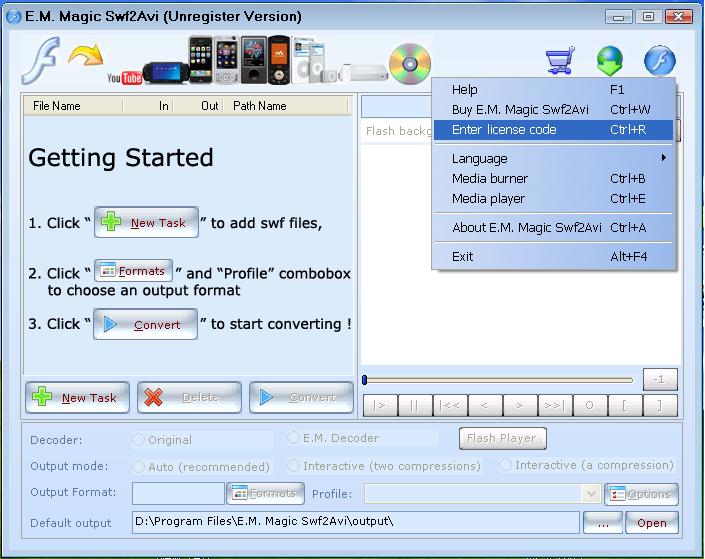
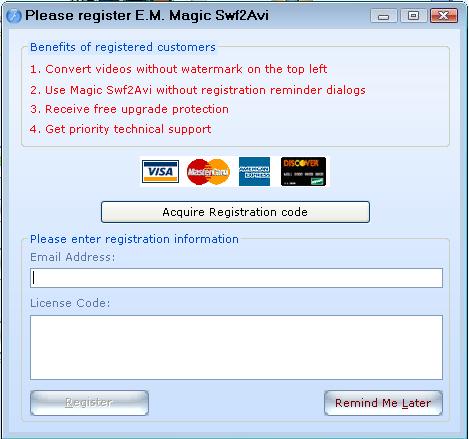
3. Input your license code to the following window, then your registration is completed.
Q: Can you give me the options for the command line version?
A: E.M. Magic Swf2Avi command line options (only support for pro version)
- /h or /help --- Help information
- /f --- Input file
- /o --- Output file
- /if --- In frame > 0
- /of --- Out frame < frame count
- /de --- Decoder
- 0 - Original
- 1 - Decoder 1
- 2 - Decoder 2
- /om --- Output mode
- 0 - Auto(recommended)
- 1 - Interactive(a compression)
- 2 - Interactive(two compressions)
- /fd --- Frame duration, only for interactive mode, default 5s
- /pi --- Output settings using ini filename
- /pn --- Output settings using profile name in ini file
- /c --- Background Color (R G B), eg: /c 255 255 255
- Convert Flash file:
eg: mswf2avi /f in.swf /o out.mpg /pi ini\ntscdvd.ini /pn mpg Normal
- Convert Flash file with background color:
eg: mswf2avi /f in.swf /o out.mpg /c 255 255 255 /pi ini\ntscdvd.ini /pn mpg Normal
- Convert Flash file with interactive mode:
eg: mswf2avi /f in.swf /o out.mpg /om 2 /fd 5 /pi ini\ntscdvd.ini /pn mpg Normal
- Convert Flash file with decoder modules:
eg: mswf2avi /f in.swf /o out.mpg /de 1 /pi ini\ntscdvd.ini /pn mpg Normal
- Get images:
eg: mswf2avi /f in.swf /o out /pi ini\jpegimg.ini /pn JPEG images Normal
|